Device description
Thank you for your interest in the MNemo! We will start with a short description of the components of the device
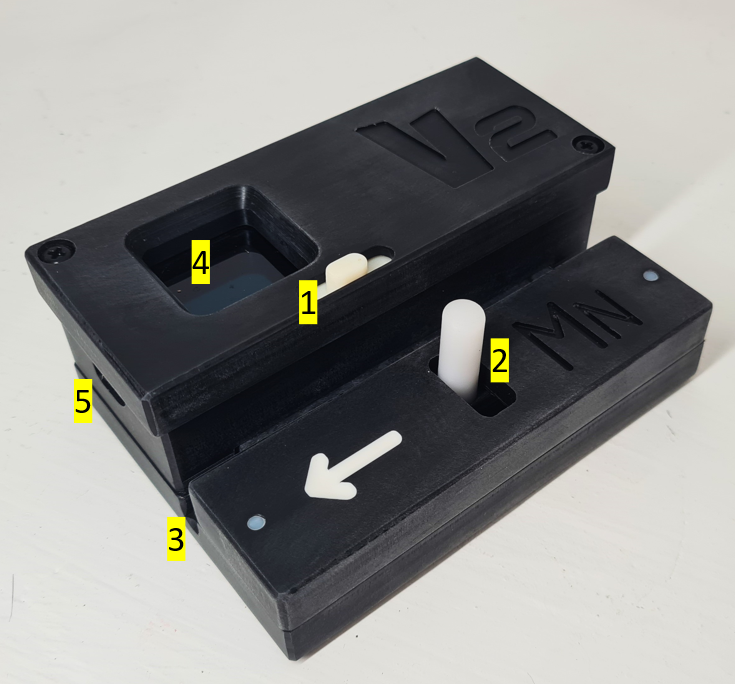
1 - Slider Control
It's through this slider that you're gonna interact with the MNemo.
- Moving the slider Left is the equivalent of an Enter or Select order.
- Moving the slider Right is the equivalent of a Next or Scroll order.
2 - Pressure Plate lever
This is the part you will have to pull back to open the device an lock the cave line in it.
Tip: When pulling the plate back apply the pressure at the bottom of the lever
3 - Line Slot
This is where the cave line will slide though the device after opening and releasing the pressure plate lever.
The device will fit line up to 6mm diameter
4 - Display
The device has an OLED graphical color display. The text, icon and background colors will guide you through the survey process.
5 - USB Port
This is the port used to connect your device to your computer to adjust settings or download data
The recommended way to download data is through wifi either by connecting your device to the local network or activating it as Wifi Access Point
It is also the port used for charging the device. Any 5V USB charger or computer USB port can be used to recharge the MNemo.